
For years, sending a photo from an Android phone to an iPhone meant compressing it through a messaging app, uploading to cloud storage, or hunting for a cable. Google’s Quick Share, the wireless file transfer tool that replaced Nearby Share in 2024, has spent the last year dismantling that wall. Thanks to direct interoperability with Apple’s AirDrop and a dedicated Windows app, the system now handles cross-platform photo sharing without third-party workarounds. The shift matters because it treats file transfer as infrastructure rather than an afterthought, letting the devices handle the heavy lifting while you simply tap and send.
What Changed and Why the Old Way Felt Broken
Quick Share is the unified branding for what used to be called Nearby Share. In 2024, Google merged its own proximity protocol with Samsung’s earlier Quick Share technology to create a single standard across Android phones, tablets, and Chromebooks. Before that unification, Android users had a reliable way to beam files to other Android devices, but iPhones and Macs lived in a separate universe.
Windows users weren’t entirely left out, yet the experience often required browser-based uploads or Samsung-specific apps that didn’t always play nicely with non-Samsung hardware.
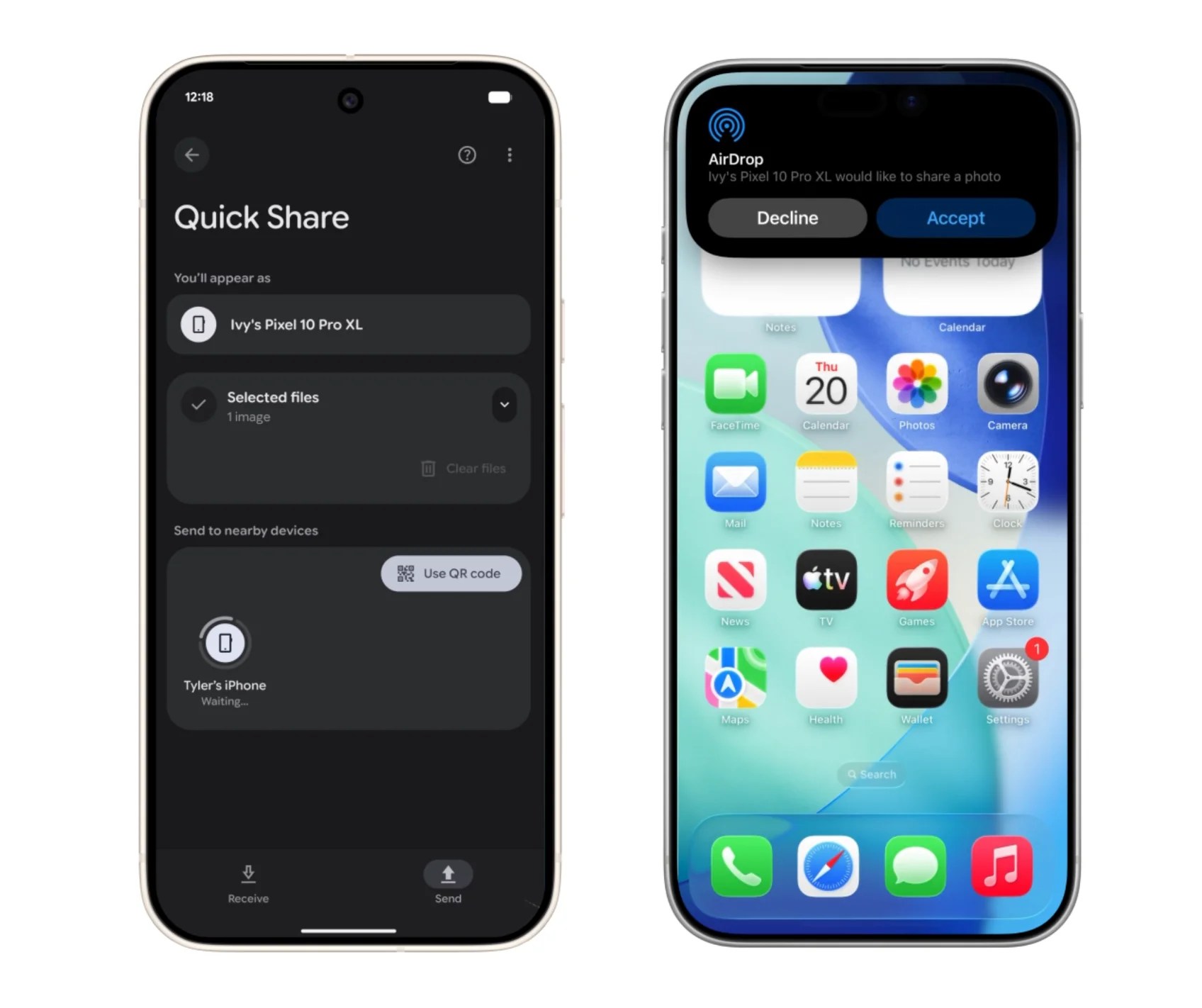
The real change arrived when Google built an interoperability layer that speaks directly to Apple’s AirDrop protocol. Starting with the Pixel 10 family in late 2025 and expanding to more Android devices through 2026, Quick Share can now discover iPhones, iPads, and Macs as if they were native endpoints. Initial support required specific Pixel models, but Google has since committed to a wider rollout across the ecosystem. On the Windows side, the dedicated Quick Share app for Windows 10 and 11 now offers the same direct handshake, letting you move entire folders or high-resolution photo albums from your phone to a PC without touching a cable or cloud server.
For iPhone owners evaluating their next upgrade, ecosystem barriers are slowly lowering. You might still track Apple’s latest trade-in adjustments for older devices, but sharing photos with Android family members no longer forces anyone into a specific brand.
How the Technology Actually Works
Under the hood, Quick Share uses Bluetooth Low Energy to find nearby devices and then switches to Wi-Fi Direct for the actual file transfer. That combination means you don’t need internet access or cellular data to move a 4K video from one device to another. The transfer stays local, which keeps speeds high and keeps your photos off external servers. Recent updates have also improved transfer reliability and automatic Wi-Fi handling during sessions, so you’re less likely to see a stalled progress bar at ninety-nine percent.
When you tap Share and select Quick Share, your phone broadcasts a short-range signal. Compatible devices appear in a list, the recipient taps to approve, and the exchange begins. For Android-to-Android transfers, this has been the standard flow since the Nearby Share days. The new wrinkle is how the system handles Apple hardware.
When an Android device targets an iPhone, Quick Share taps into AirDrop’s peer-to-peer network. The iPhone owner needs to set AirDrop visibility to Everyone, at least temporarily, because Apple still controls the discovery rules on its side. Android’s support page outlines this requirement clearly, noting that both Bluetooth and Wi-Fi must remain active during the session.
Windows transfers work through the same BLE-plus-Wi-Fi Direct handshake, but they require the official Quick Share app installed on the PC. Once the app is running, your Android phone sees the computer alongside other nearby devices. If direct proximity isn’t practical, Quick Share can also generate a QR code or a shareable link as a fallback. Those options bridge the gap when you’re not in the same room or when one device doesn’t support the native protocol.
Security-wise, the transfers use end-to-end encryption, and recipient approval is always required. Google has emphasized independent security testing specifically for the AirDrop bridge, which matters because mixing two different corporate ecosystems introduces complexity that neither side controls entirely.
For households split between Android and iPhone users, the practical benefit is straightforward. You can hand a full-resolution photo to a family member without watching a messaging app crush the quality or waiting for a cloud sync. The same applies to creative workflows where you shoot on an Android phone but edit on a Windows desktop. The file lands locally, privately, and quickly.
That said, the experience still carries some friction. AirDrop compatibility currently demands that Apple devices accept transfers from Everyone, since Contacts-only mode can’t recognize Android senders as trusted contacts. Google offers time-limited Everyone windows to reduce exposure, but it’s worth switching back to Contacts-only or turning discovery off afterward. You may also notice a brief Wi-Fi handoff during Apple-device sessions as the phones negotiate their direct connection.
As this capability expands beyond early Pixel adopters to the broader Android lineup, the old excuses for platform lock-in in basic file sharing are fading. It won’t resolve every ecosystem battle.
You’ll still need updated software on both sides for the handshake to succeed, and Samsung’s original Quick Share DNA, which allowed multi-device broadcasts and larger daily limits, continues to influence how Google scales the feature across hardware from advanced OLED panels to budget handsets. But the underlying message is clear. Your phone’s brand shouldn’t dictate whether you can share a memory with someone standing right next to you. Google has finally built the plumbing to make that true, and it’s about time.